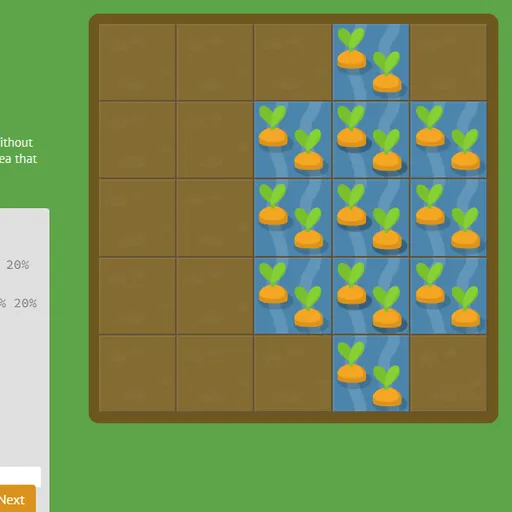
CSS Grid Carrot Patch is a coding puzzle that teaches CSS grid layout in a garden. The garden is a five-by-five grid with carrots and weeds in some squares. Your goal is to write CSS that places water over the carrots and poison over the weeds.
How CSS Grid Carrot Patch Works
Each level shows a lesson, a code box and the garden. The garden is a real grid container, so the patch moves as you type. When it covers exactly the right squares, the Next button lights up.
Early levels use grid-column-start and grid-column-end, negative line numbers and span. Then you combine them with grid-column, grid-row and grid-area, and some levels have two patches that overlap.
Later you use order to shuffle auto-placed items, and finally reshape the grid with grid-template-columns, grid-template-rows and grid-template. Units include percentages, pixels, ems, repeat() and fr.
Your First Few Minutes
- Read the short lesson above the code box.
- Find the carrot and count grid lines from the left edge.
- Type a value such as
grid-column-start: 3;and watch the water move. - Adjust until the water covers only the carrot.
- Press Next or Enter to move on.
Controls for CSS Grid Carrot Patch
| To do this | Keyboard | Mouse | Touch screen |
|---|---|---|---|
| Type CSS | Type in the code box | not used | Tap the code box and use the on-screen keyboard |
| Submit a correct answer | Enter on the last line, or Ctrl + Enter | Click "Next" once it lights up | Tap "Next" |
| Pick a level | not used | Click the level counter, then a level number, or use the side arrows | Tap the level counter, then a level number |
| Read about a property | not used | Point at a highlighted property name in the instructions | not used |
What It Trains
This game teaches real coding. You write CSS grid properties that work the same way in a web page.
It also builds spatial thinking. You picture rows and columns as numbered lines and work out where an area starts and stops.
Strategy Notes
- Think in lines. Columns 2 through 4 run from line 2 to line 5.
- Reach for span.
span 3covers three cells from wherever you start. - Learn the grid-area order. It is row start, column start, row end, column end.
- Let fr split what is left. Fixed sizes come first, then fr shares the rest.
- Hover over property names. The lesson words list the values they accept.
Good to Know
Your level, typed answers and solved list are saved in the browser, and a Reset link clears them. On tablets the garden and editor stack, and you type with the on-screen keyboard. Thomas Park made the original, called Grid Garden.