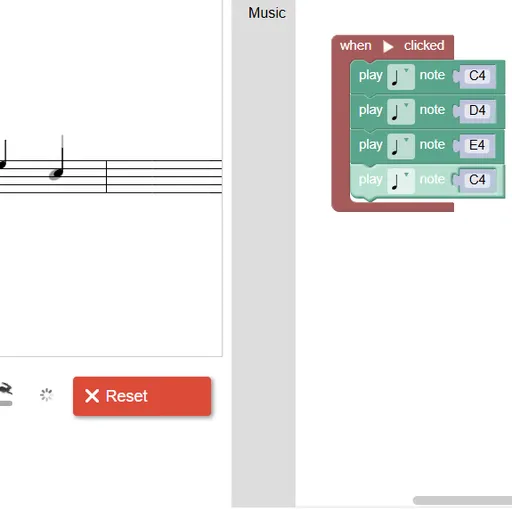
Block Code Music turns a program into a song. Each block sounds a note rather than moving a hero, and the target melody sits on a staff to the left. The goal is to match each tune and learn to use functions so a phrase is written once and played many times.
How Block Code Music Works
Every program hangs from a starter block labeled when Run clicked. Place play note blocks under it, pick a pitch and a length for each, then hit Run Program. Your notes appear in black over the gray target notes. Match the target and the game shows the JavaScript your blocks made.
From level 2 on, you are asked to reuse phrases with functions. If you repeat note blocks instead, the game reminds you that your solution could be better.
Later levels add a set-instrument block and a rest block. The last target levels run several starter blocks together, each delayed with rests, so the voices stack into a round.
Your First Few Minutes
- Look at the gray notes on the staff to see the target.
- Drag four play note blocks under the start block.
- Set each pitch to match the staff, then press Run Program.
- On the next level, move those notes into a function block.
- Call the function twice and run it again.
Controls for Block Code Music
| To do this | Keyboard | Mouse | Touch screen |
|---|---|---|---|
| Add note, rest or function blocks | not used | Click the Music category and drag a block into the workspace | Tap the category and drag a block |
| Choose a pitch | Type a note name such as D4 and press Enter | Click the note name and pick a line on the small staff | Tap the note name and pick a line |
| Choose a note length | not used | Click the note symbol on the block | Tap the note symbol |
| Play or stop your tune | not used | Click Run Program, then Reset | Tap Run Program, then Reset |
| Change playback speed | not used | Drag the tempo slider | Slide the tempo control |
What It Trains
You practice a key coding idea: write a piece once, give it a name and reuse it. A tune with repeated phrases becomes a short, readable program.
Careful listening matters too. You compare what you hear and see on the staff with the target, then track down the one pitch or length that is off.
Strategy Notes
- Name each phrase. Clear labels for each section keep a long song tidy.
- Let the staff guide you. Gray notes show exactly what is still missing.
- Fix lengths, not counts. A phrase that finishes on a held note needs a longer length, not an extra block.
- Use rests for the round. Rests make each new voice enter after the last.
- Pick different sounds. Separate instruments make each voice easy to hear.
Good to Know
The music stays silent until you run your program, and Reset cuts it off instantly. Eight sampled instruments are included, among them piano, banjo, trumpet and violin. Blocks work with mouse or touch, and a larger screen gives the staff and workspace more room.