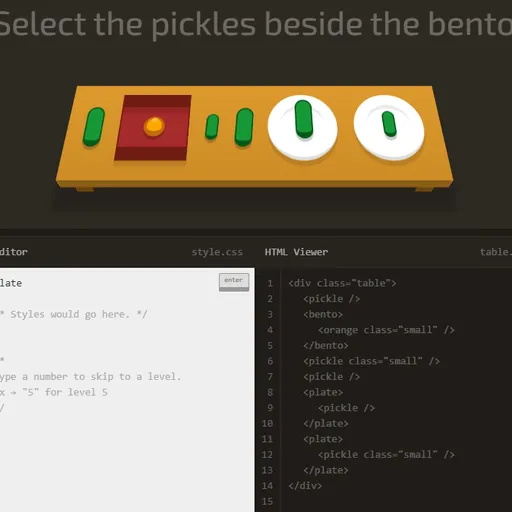
CSS Diner is a puzzle game that teaches CSS selectors. Each level sets a table with plates, bento boxes, apples, oranges and pickles, along with an order such as “Select the small apples.” Your goal is to type the selector that targets just those items.
How CSS Diner Works
The items you need bounce on the table. Under it, the HTML Viewer shows the real markup, and a side panel explains the selector for that level with syntax and examples. Type in the CSS Editor and press Enter.
Your selector is tested against actual elements. If it picks exactly the bouncing items, they fly off and the next level loads. Any answer that selects the right set counts, even if it differs from the example.
Levels grow step by step. After basics come descendants, commas and *, then +, ~ and >. Later levels cover pseudo-classes like :first-child, :nth-of-type, :empty and :not(), and finally attribute matches such as ^=, $= and *=.
Your First Few Minutes
- Read the order at the top of the table.
- Look at the HTML Viewer to see the real tag names.
- Type a selector such as
plateand press Enter. - If items shake, hover over the table to match items to code.
- Read the side panel before each new level.
Controls for CSS Diner
| To do this | Keyboard | Mouse |
|---|---|---|
| Type a selector | Type in the CSS Editor box | not used |
| Check your answer | Enter | Click the "enter" button |
| Jump to a level | Type the level number, then Enter | Open the menu (top right) and click a level |
| See an item's HTML | not used | Hover over an item on the table or a line in the HTML Viewer |
| Previous or next level | not used | Click the arrows beside the level title |
| Close the level menu | Esc | not used |
What It Trains
CSS Diner is a direct coding lesson. You learn real selector syntax and see right away which elements a rule matches.
It also builds logic. You think about structure, such as which item is a child of which, and write a rule that includes the right items and nothing else.
Strategy Notes
- Start from the markup. The HTML shows the classes and IDs you can use.
- Use hover to connect. Pointing at an item highlights its code line, and the reverse works too.
- Remember nth counts from 1.
:nth-child(3)is the third child. - Know the space from the arrow.
plate applefinds any apple inside a plate, whileplate > appleneeds a direct child. - Adapt the examples. The help panel shows the exact pattern for the level.
Good to Know
Your current level and solved levels are saved in your browser. It runs best on a computer, since the two-column layout needs a wide screen and the hover tips need a mouse. Luke Pacholski (flukeout) made the original under MPL-2.0.