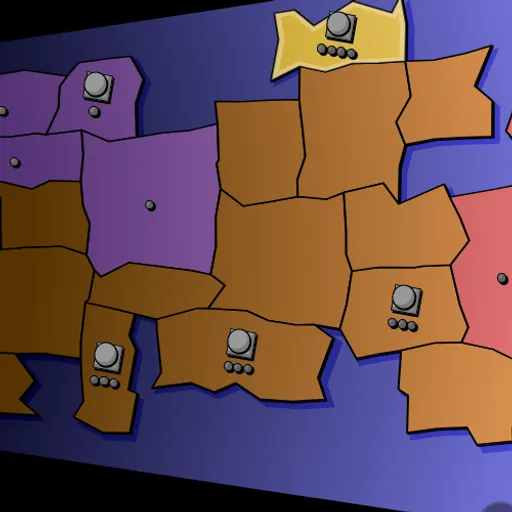

Compact Conflict is a turn-based territory game for up to four players on a freshly generated map. Each region holds soldiers, and some hold temples that raise troops and earn faith. Your goal is to own more regions than anyone else when the last turn ends.
How Compact Conflict Works
You get three actions per turn. Pick one of your regions, choose how many troops go, and click a bordering region. Unowned ground becomes yours right away. Pushing into a rival’s land triggers a fight, and the region flips only when no defender survives. Troops that just won a region sit out until your following turn.
When you finish, every temple you control produces a fresh soldier. Faith comes in too, counted from your land and from troops stationed on temples. Defenders who fall still earn you four faith apiece.
Click a temple to spend faith. Extra troops cost more each time you buy within one turn. The four blessings are Water for more income, Fire to shield attackers, Air for bonus actions and Earth to strike invaders before combat. Every blessing has two tiers and vanishes if an enemy takes that temple.
Your First Few Minutes
- On setup, make one color Human, set the others to AI on Nice and choose 12 turns.
- Click a region you own, then a neutral neighbor to claim it.
- Head for the nearest neutral temple.
- End your turn and watch your faith total rise.
- Click your temple and buy a soldier or an element.
Controls for Compact Conflict
| To do this | Mouse | Touch screen |
|---|---|---|
| Select an army to move | Click a region you own that still has soldiers able to move | Tap the region |
| Change how many soldiers go | Click the selected region again to cycle the count | Tap the selected region again |
| Move or attack | Click a neighboring region | Tap a neighboring region |
| Buy a soldier or an upgrade | Click one of your temples, then a button in the side panel | Tap the temple, then a panel button |
| Undo, end turn, sound, rules, restart | Buttons in the side panel and the round icons at the bottom right | Tap the same buttons |
What It Trains
This game is all about strategy. You weigh attacking now against growing stronger, and you plan which border to hold and which to give up.
There is simple math in every fight and every faith count. Bigger stacks win far more often, so you compare numbers before you move.
Strategy Notes
- Rush the unclaimed temples. Free troops every turn snowball across a long game.
- Leave a guard on each temple. That troop prays for faith and protects your best asset.
- Fight with a big advantage. Bring a larger stack rather than trading evenly.
- Spread out at the end. Only region count matters when time runs out.
- Pick an element for your plan. Water helps long games, Air helps fast growth, and Earth makes a border temple hard to crack.
Good to Know
Compact Conflict works with mouse or touch and fits phones in landscape. Your setup choices are saved in the browser, and a five-card rules guide opens from the question mark button. Jakub Wasilewski wrote it for js13kGames in 2014, where the whole game had to fit in 13 kilobytes.