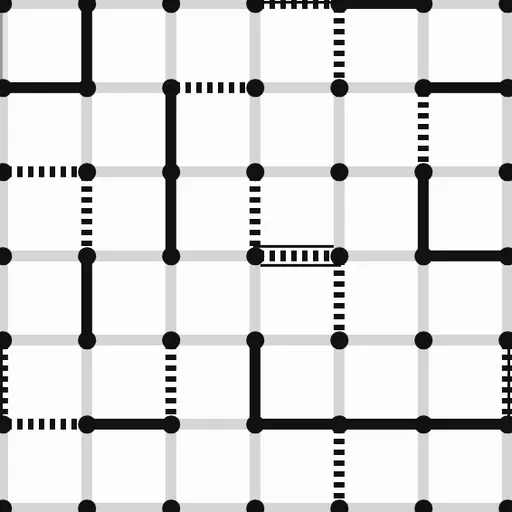
Dots and Boxes is the old notebook game of joining dots, now on a crisp black-and-white grid. You and an opponent add one line at a time, and whoever closes a square owns it and moves again. The goal is to own more squares than the other side once the grid is full.
How Dots and Boxes Works
Start by choosing a grid of 4x4, 5x5, 6x6 or 8x8 boxes, with 6x6 as the default. Player 1 opens. Each turn you draw a single line, across or up and down, between two dots that sit next to each other. A spot that already has a line is closed.
Every square has four sides. Drawing the last one claims it, and the square gets a cross for Player 1 or a circle for Player 2. Player 1 draws solid lines and Player 2 draws dotted ones. After a claim you must draw again, and your turn only passes after a line that finishes nothing.
When no lines are left, the score line under the grid shows who has more boxes. You can face the computer at Easy, Medium or Hard, or share the device with a friend.
Your First Few Minutes
- Click “vs Computer”, pick Player 1, choose Easy and the 4x4 grid, then click “New game”.
- Draw a few lines on the edge, making sure no square gets its third side.
- When the computer gives a square a third side, close it and draw your bonus line.
- Keep going until the grid fills, then check the score line.
- Try Medium or a larger grid once you can avoid giving away free squares.
Controls for Dots and Boxes
| To do this | Keyboard | Mouse | Touch screen |
|---|---|---|---|
| Draw a line | Arrow keys to reach a line, Enter to draw it | Click the gap between two neighboring dots | Tap the gap between two neighboring dots |
| Start a game against the computer | not used | Click "vs Computer", pick Player 1 or 2, a level and a grid size, then click "New game" | Tap "vs Computer", pick Player 1 or 2, a level and a grid size, then tap "New game" |
| Play a friend on one screen | not used | Click "2 Player (local)" | Tap "2 Player (local)" |
| Take back a move | not used | Click "Undo" | Tap "Undo" |
| Open settings | not used | Click "Settings" | Tap "Settings" |
What It Trains
Each turn asks you to count sides before you act. You check whether a line gives any square its third edge, and later you count how long each chain of squares is. That turns the board into a small math problem about which group to give away.
It also builds planning. In the late game you try to predict who will be forced to open the next chain, a few moves before it happens.
Strategy Notes
- Never hand out a third side. Any square with three sides is a free gift for the next player.
- Use safe lines while they last. Early on, draw lines that keep every square at two sides or fewer.
- Spot chains early. Squares in a row with two sides each will fall together once someone opens them.
- Give away the smallest group. When every move opens something, open the shortest chain.
- Keep a chain count. On big grids, knowing how many chains remain helps you see who will be forced to open them.
Good to Know
This version comes from Christopher Müller’s open-source PaperGames collection. Settings include text size, high contrast, spacing and how fast the computer replies. It fits phones held upright, and the two-player mode lets friends pass one device back and forth.