Chess vs Computer pits you, playing White, against a compact engine written in JavaScript. You move, the engine thinks briefly, and Black replies. Your goal is the classic one: checkmate the enemy king.
How Chess vs Computer Works
Every standard rule is in place, including castling and en passant. Drag a piece to a legal square to move it, and an illegal move snaps back. With a mouse, hovering over a piece shades the squares it can reach. Pawns that reach the last rank always become queens, for both sides.
The engine uses minimax search with alpha-beta pruning and scores positions using piece values and square tables. After each reply it reports how many positions it checked and how long it took.
An Advantage bar shifts as the balance changes. The Status line flags check and explains how a game ended: checkmate, stalemate, threefold repetition, the 50-move rule or too little material to mate.
Your First Few Minutes
- Open Settings and set the engine depth to 2.
- Drag a center pawn forward two squares.
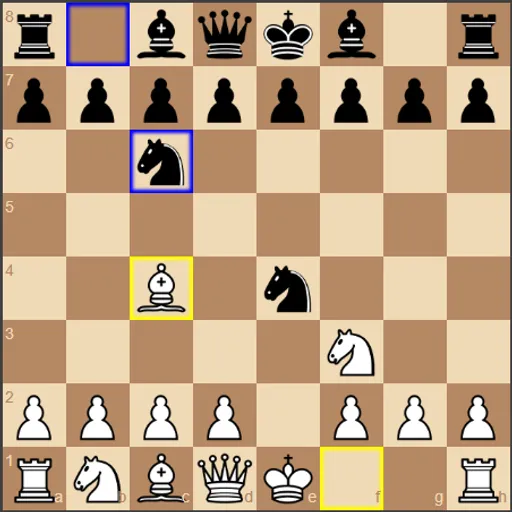
- Watch the blue outline to see how Black answered.
- Check the Advantage number after each move to spot mistakes.
- If you blunder, press Undo, which takes back your move and the reply.
Controls for Chess vs Computer
| To do this | Mouse | Touch screen |
|---|---|---|
| Move a piece | Drag the piece to its new square | Drag the piece to its new square |
| Preview legal moves | Hover over one of your pieces | not used |
| Take back your last move and the reply | Click "Undo" | Tap "Undo" |
| Replay moves you took back | Click "Redo" | Tap "Redo" |
| Change engine depth or turn on hints | Open "Settings" and pick a value or tick the box | Open "Settings" and pick a value or tick the box |
| Load an opening or restart | Open "Opening Positions" and click a button | Open "Opening Positions" and tap a button |
What It Trains
Chess is strategy in its purest form. You plan several moves ahead, weigh trades and protect your king while building an attack.
This version also makes your thinking visible. The live score shows when a move hurt you, and hints let you compare your choice with the engine’s.
Strategy Notes
- Climb slowly. Win a few games at depth 2 before trying 4 or 5.
- Read the score jump. A sudden swing after your move often means a piece is hanging.
- Treat hints as advice. Look at the suggestion, then decide whether it fits your plan.
- Study a single opening. Load one line and practice the positions that follow it.
- Watch for stalemate. Since promotion is always a queen, check that the enemy king still has a move.
Good to Know
You can drag pieces by finger, but on narrow screens the menus stack above the board, so a wide screen is easier. Higher depths make the page wait while the engine thinks. The engine is Zhang Zeyu’s open-source chess-ai, with piece images by Cburnett.