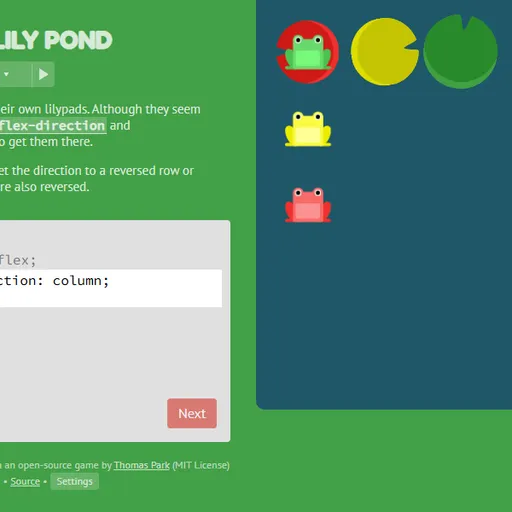
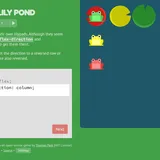
Flexbox Lily Pond is a coding game that teaches CSS flexbox with frogs and lily pads. Each frog, whether green, yellow or red, belongs on the pad that shares its color. To move them you type genuine CSS rules for the pond, exactly the kind developers use when arranging a website.
How Flexbox Lily Pond Works
A level shows a brief lesson, an editor and the pond. The editor starts with display: flex; already set on #pond, and you supply what is missing. It only gives you as many lines as the level calls for, and hitting Enter on the final one submits your answer.
The frogs move live as you type. The game checks your answer by applying your CSS for real, so any valid code that lands every frog on a matching pad passes. When that happens, the Next button lights up.
There are 24 levels, each adding one idea. You start by moving frogs along a row with justify-content and up or down with align-items. Next, flex-direction switches the layout between rows and columns or flips its order. Later levels bring in order and align-self for single frogs, flex-wrap and flex-flow to break frogs over more than one line, and align-content for the gaps between lines.
Your First Few Minutes
- Read the lesson for level 1 and note which property it uses.
- Click the highlighted property name to see its possible values.
- Type one value, such as flex-end, and watch the frogs slide.
- Try other values until every frog sits on its pad.
- Press Next, and keep Beginner on until the ideas feel familiar.
Controls for Flexbox Lily Pond
| To do this | Keyboard | Mouse | Touch screen |
|---|---|---|---|
| Type CSS | Type in the code box | not used | Tap the code box and use the on-screen keyboard |
| Submit a correct answer | Enter on the last line, or Ctrl + Enter | Click "Next" once it lights up | Tap "Next" |
| Pick a level | not used | Click the level counter, then a level number, or use the side arrows | Tap the level counter, then a level number |
| Read about a property | not used | Click a highlighted property name in the instructions | Tap a highlighted property name |
| Change difficulty or colorblind mode | not used | Click "Settings" under the editor | Tap "Settings" |
What It Trains
You are writing working code, so this builds real coding habits: exact syntax, testing a change and reading the result. It also trains spatial thinking, since you picture how a main axis and a cross axis shift when the direction flips.
Strategy Notes
- Find the main axis first. justify-content works along whatever axis flex-direction sets, which is vertical when the pond is a column.
- Mind reversed directions. A reversed row or column swaps where start and end are, which trips up many players.
- Use the value lists. The clickable property names show every option, which beats guessing.
- Target one frog when asked. Some levels hand you a selector for a single frog color, so you adjust just that one.
- Tell the aligns apart. align-items works inside each line, and align-content spaces whole lines once they wrap.
Good to Know
There are three settings. Beginner shows full lessons, Intermediate hides them, and Expert hides them while sending you somewhere random after every Next. On a slim screen the editor sits on top of the pond, so it works on phones with the on-screen keyboard.