SQL Detective Mystery turns a database into a crime file. Someone was killed in SQL City, the report is dated January 15, 2018, and you only recall that a crime scene report was filed. Witnesses, gym visits, car records and more all hide in tables. Your goal is to name the killer using SQL that runs right in the page.
How SQL Detective Mystery Works
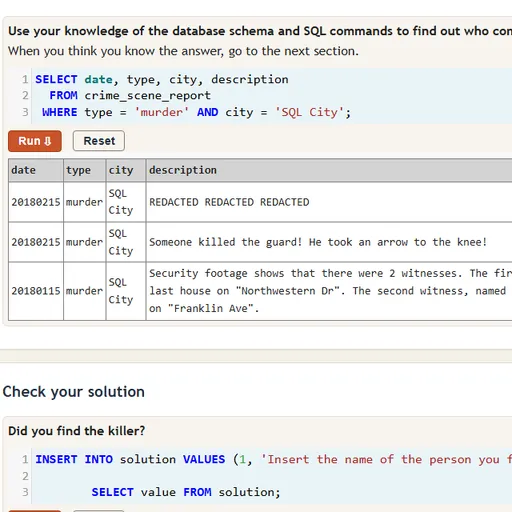
The page holds a set of code boxes. Each starts with a sample query that you are free to change, and running it prints a results table beneath. The opening boxes reveal the table names and the column layout of a chosen table.
The trail starts with the crime scene report. That report points to witnesses. Find their records, read what each one told police, and you get leads such as a membership and a vehicle to chase through other tables.
Once you have a suspect, enter the name in the answer box at the bottom and run it. A correct guess unlocks a tougher follow-up.
Your First Few Minutes
- If SQL is new to you, open the walkthrough link first.
- Run the starting queries to see the table names.
- Open the database diagram to see how tables connect.
- Filter the crime scene reports by date, city and type.
- Follow the witnesses into the interview table and keep notes.
Controls for SQL Detective Mystery
| To do this | Keyboard | Mouse | Touch screen |
|---|---|---|---|
| Type or edit a query | Type in the code box | Click inside a code box | Tap a code box to bring up the keyboard |
| Run the query in a box | Shift + Enter | Click Run | Tap Run |
| Put the box back to its starting query | not used | Click Reset | Tap Reset |
| Show the database diagram | not used | Click the "click here" link above the last code box | Tap the "click here" link |
| Reveal a suggested query (walkthrough page) | not used | Click Show Solution | Tap Show Solution |
What It Trains
This is hands-on coding. You write real queries, read the output and adjust, just as you would with any database. Each clue turns into a filter or a join.
It also trains logical thinking. You build a case step by step, ruling people out until only one fits all the facts.
Strategy Notes
- Check the schema early. The diagram maps which ID columns connect people to licenses, statements and gym records.
- Narrow with WHERE. Pin down the type, the city and the date and over a thousand reports shrink to one.
- Match loose names with LIKE. Some people are described only partly, so a pattern with % wildcards beats an exact match.
- Sort for extremes. Sorting in descending order and keeping one row finds the highest address number.
- Join tables in one query. Linking tables lets a single query test several clues at once.
Good to Know
The data set covers roughly 10,000 residents and more than a thousand reports, all running locally in the browser. Typing is easiest with a real keyboard. The case was made by NUKnightLab and is shared under CC BY-SA 4.0.