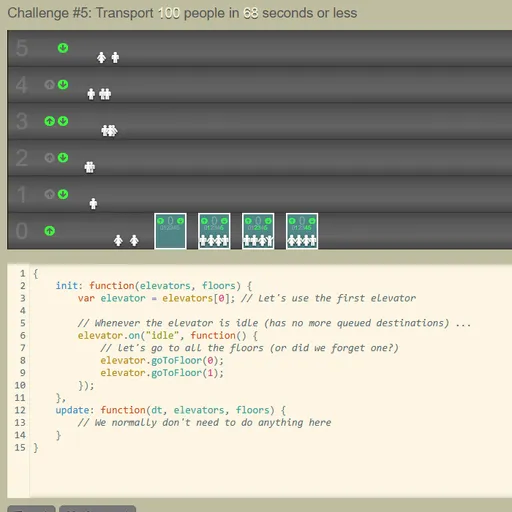
Elevator Saga is a programming game where you control elevators only through code. You write a short JavaScript program, press Apply, and watch little riders step in and out as your logic runs. The goal of each challenge is to move people efficiently enough to meet a target.
How Elevator Saga Works
The building sits at the top of the page, and riders appear on floors pressing up or down. The editor below starts with a basic program. Your code must be an object with two functions. init runs once when the challenge begins, and update runs over and over as time passes.
Most of the work happens in init. You attach events to each elevator, such as idle, floor_button_pressed and stopped_at_floor, and to each floor, such as up_button_pressed and down_button_pressed. Inside them you call goToFloor, check loadFactor to see how full a car is, or change the destinationQueue.
The 18 graded challenges grow from one car and a few floors to several cars of different sizes and up to 21 floors. If your code has a syntax error or is missing init or update, a red message shows above the editor and nothing moves.
Your First Few Minutes
- Read the first goal above the building.
- Open the Help page to see the list of elevator and floor functions.
- In init, add a floor_button_pressed listener that calls goToFloor with that floor.
- Click Apply and watch whether riders reach the top floor.
- When the goal is met, move on and add hall call handling.
Controls for Elevator Saga
| To do this | Keyboard | Mouse |
|---|---|---|
| Type and edit your elevator program | Type in the code editor (Tab inserts four spaces) | Click inside the editor to place the cursor |
| Run your code from the start of the challenge | not used | Click "Apply" |
| Start, pause or restart the simulation | not used | Click the Start / Pause / Restart button |
| Change simulation speed | not used | Click the minus or plus icon next to the speed number |
| Go to the next challenge after a win | not used | Click "Next challenge" |
| Save, reset, or bring back code from before a reset | not used | Click "Save", "Reset" or "Undo reset" |
What It Trains
This game is real coding practice. You write event handlers, read state like loadFactor, and debug when riders pile up on a floor. Each challenge also asks for logic about scheduling, such as when an empty car should wait and when it should move.
Strategy Notes
- Serve every requested floor. Respond to buttons inside the car first, since the starter code ignores them.
- Send idle cars to waiting riders. Use the floor up and down button events so empty cars head where people are.
- Do not stop when full. Check loadFactor before picking up, because a packed car cannot take more riders.
- Read the goal type. Move-limited challenges punish extra trips, so group riders before you travel.
- Test fast, then watch slow. A high time scale checks a plan, and a low one shows where it breaks.
Good to Know
Your program is saved in the browser about a second after you stop typing, and the Save button stores it at once. Clearing browser data erases it. The layout is wide and built around a code editor, so it needs a laptop or desktop with a keyboard.