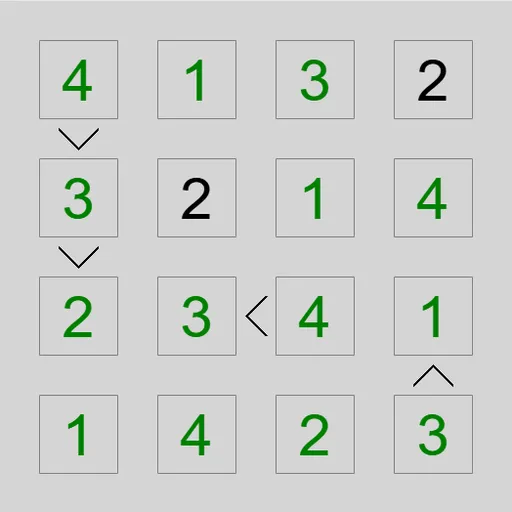
Greater-Than Grid is a number puzzle built on comparison signs. You place digits so that no row or column repeats, and every little sign between two squares points the right way. Solve the grid using only the signs and a few starting digits.
How Greater-Than Grid Works
On a grid that is N squares wide, you use the digits 1 through N. Every row and every column must hold each of those digits exactly once. On a 6x6 grid, that means 1 to 6 in each line.
In the standard Unequal mode, signs sit between some neighboring squares. They work just like the math symbols: the wide side faces the bigger digit, and the point faces the smaller one. Tougher levels show fewer signs, and some puzzles give you a few digits to begin with.
Adjacent mode uses bars instead. A bar means the two digits are one apart, and since every bar is drawn, a missing bar is a clue too. Presets run from 4x4 Easy to 7x7 Extreme, and Custom lets you pick bigger grids and other levels.
Your First Few Minutes
- Choose the 4x4 Easy preset from the menu.
- Find a square on the small side of a sign and rule out the top digit there.
- Find a square on the big side and rule out 1.
- Press H to add pencil marks, then trim them with the signs.
- Fill any square left with only one option, and repeat.
Controls for Greater-Than Grid
| To do this | Keyboard | Mouse | Touch screen |
|---|---|---|---|
| Enter a digit | Arrow keys to move, then type the digit | Click a square, then type a digit | Tap a square, then tap a digit button |
| Add or remove a pencil mark | Enter switches the cursor to pencil mode, then type a digit | Right-click a square, then type a digit | Set Tap to Pencil mark (or press and hold a square), then tap a digit |
| Clear a square | Space, Backspace or 0 | not used | Tap the square, then Clear |
| Fill in every possible pencil mark / also remove the obvious ones | M / H | not used | not used |
| Grey out a clue sign you have used | Shift or Ctrl + arrow key next to the clue | Click the sign | Tap the sign |
| New game, undo, redo | N, U, R | Menu buttons above the grid | Menu buttons above the grid |
What It Trains
You compare numbers all the time: if this square is less than that one, and that one is less than the next, the first can be at most N minus 2. Chains like that build number sense and step-by-step logic, while tracking rows and columns keeps your focus sharp.
Strategy Notes
- Use the ends of the range. The small side of a sign can never hold N, and the big side can never hold 1.
- Follow chains of signs. A run of climbing signs pins the first and last squares tightly.
- Look for local lows. A square smaller than all its neighbors is often a 1 or 2.
- Read missing bars. In Adjacent mode, no bar means the digits are not consecutive.
- Let H do the busywork. It writes the starting marks so you can spend time on the signs.
- Grey out used signs. It makes the clues you still need stand out.
Good to Know
It fits phones in portrait, with digit buttons under the grid for touch. There is no sound. The puzzle is Unequal by James Harvey, from Simon Tatham’s Portable Puzzle Collection. For another grid puzzle from the same collection, try Galaxies Symmetry Puzzle.