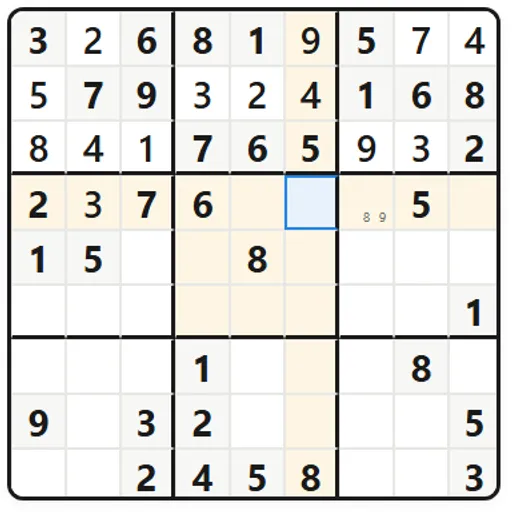
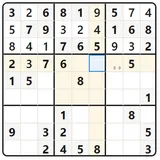
Sudoku Flow is a polished version of the 9x9 digit puzzle. You place the numbers 1 through 9 so that none repeats in any row, column or 3x3 box. Along with the main grid, you get pencil notes, layered hints, a daily challenge and short lessons on solving methods.
How Sudoku Flow Works
The gray cells are given clues and stay locked. Pick any blank cell and type a digit, or tap it on the number pad. If your entry clashes with a matching digit in the same row, column or box, those cells flash and your mistake count goes up by one.
New Game lets you pick a level. Easy has the most clues, Insane drops to just 17 to 21, and Custom sets the clue count with a slider. Modes include Classic, Zen, Timed Rush with a ten-minute clock, Hardcore where a third mistake ends things, and Infinite, which loads a new grid after every solve. The Daily Challenge gives everyone one medium puzzle per date.
Hints come in three strengths that you set in Settings. The lightest one points to an area, the middle one names a cell and its digit, and the strongest fills the cell and tells you the method used.
Your First Few Minutes
- Open New Game, choose Easy and the Classic mode.
- Click a filled digit to light up every copy of it on the board.
- Find a box missing just one or two numbers and fill those in.
- Press N to switch on Notes and pencil small candidates into tricky cells.
- If you stall, ask for a Level 1 hint before anything stronger.
Controls for Sudoku Flow
| To do this | Keyboard | Mouse | Touch screen |
|---|---|---|---|
| Select a cell | Arrow keys | Click a cell | Tap a cell |
| Enter a number | 1 to 9 | Click a button on the number pad | Tap a button on the number pad |
| Clear a cell | Backspace or Delete | Click "Erase" | Tap "Erase" |
| Switch pencil notes on or off | N | Click "Notes" | Tap "Notes" |
| Get a hint | H | Click "Hint" | Tap "Hint" |
| Undo or redo | Ctrl+Z, or Ctrl+Y | Click the arrow buttons in the top bar | not used |
| Pause | P | Click the pause button | not used |
| Show all shortcuts | ? | not used | not used |
What It Trains
Every move in Sudoku Flow is a small proof. You rule out digits by checking a row, a column and a box at once, and you hold several candidates in mind while you look for the one that must be true. Harder grids push you toward patterns like pairs that lock two cells together.
Strategy Notes
- Look for nearly full lines. A row or box missing one digit is the easiest place to start.
- Sweep one number across the board. Choose a digit and check every box for its only possible spot.
- Pencil in on tough levels. On Expert and Insane, notes make pairs and patterns visible.
- Try the weakest hint first. Hints cost time and points, so let a nudge do the work when it can.
- Study the Learn section. It explains singles, naked pairs, pointing pairs, X-Wing and Swordfish.
Good to Know
Your current grid, notes and timer save in the browser as you go, so you can close the tab and return on the same device. Best times, streaks and achievements are stored there too. Sudoku Flow was made by Bharani Kumar S and is open source under the MIT license.