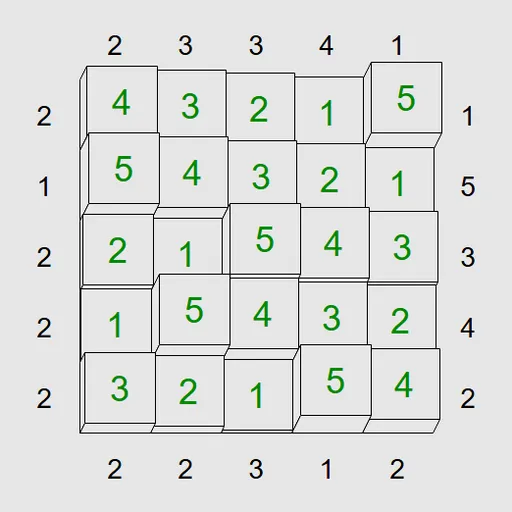
Skyscraper Sightlines asks you to plan a miniature skyline. Each cell gets one building, and the clues on the border say how many rooftops a person standing there could count. Simon Tatham created this puzzle, originally named Towers, and it is drawn here in a tidy 3D style. Your goal is to fill the grid so every rule holds.
How Skyscraper Sightlines Works
On an N by N grid, heights go from 1 up to N. Each row and each column must contain every height exactly once, the same rule a Latin square uses.
Border clues bring in a line of sight. Looking along a row or column from outside, a tall tower hides any shorter tower behind it. Take a 5x5 line reading 3, 1, 2, 5, 4. From the left you would count the 3 and the 5, so two towers. From the right you would count the 4 and the 5, also two.
Select a square and enter a height to build. Pencil marks let you note candidate heights while you think. Repeats and broken clues turn red, and the grid flashes when you finish. Presets range from 4x4 to 6x6 at four difficulty levels.
Your First Few Minutes
- Pick a 4x4 Easy puzzle from the Type menu.
- Spot every 1 clue and put the biggest height right beside it.
- If a clue equals the board width, fill that line from 1 upward.
- Press M to fill empty squares with all pencil marks.
- Remove marks that break rows, columns or clues until each square has one left.
Controls for Skyscraper Sightlines
| To do this | Keyboard | Mouse | Touch screen |
|---|---|---|---|
| Build a tower | Arrow keys to pick a square, then type its height | Click a square, then type a digit | Tap a square, then tap a digit button |
| Add or remove a pencil mark | Enter switches the cursor to pencil mode, then type a digit | Right-click a square, then type a digit | Set Tap to Pencil mark (or press and hold a square), then tap a digit |
| Clear a square | Space, Backspace or 0 | not used | Tap the square, then Clear |
| Fill every empty square with all pencil marks | M | not used | not used |
| Grey out a clue you have finished with | not used | Click the clue | Tap the clue |
| New game, undo, redo | N, U, R | Menu buttons above the grid | Menu buttons above the grid |
What It Trains
Every move is a small proof. You ask which heights could sit in a square, then strike out the ones that would repeat in a line or change a clue’s count. That is careful logic with light arithmetic.
You also learn to picture a row from the side, which helps you judge which towers block others.
Strategy Notes
- Start with 1s. When a clue says 1, the biggest tower must sit in the cell beside it.
- Use full-size clues. If a clue matches N, the line steps up one height at a time from that edge.
- Cap the first square. For a clue of c, the cell nearest it holds no more than N + 1 - c.
- Mark everything early. Pressing M gives every empty square all candidates to trim down.
- Grey out used clues. Click a finished clue so your eyes skip it.
Good to Know
Undo and redo have no limit, and Preferences offers a 3D look or a flat 2D one. The puzzle plays with mouse, keyboard or touch, and the portrait layout suits phones. It is by Simon Tatham, renamed for this site.