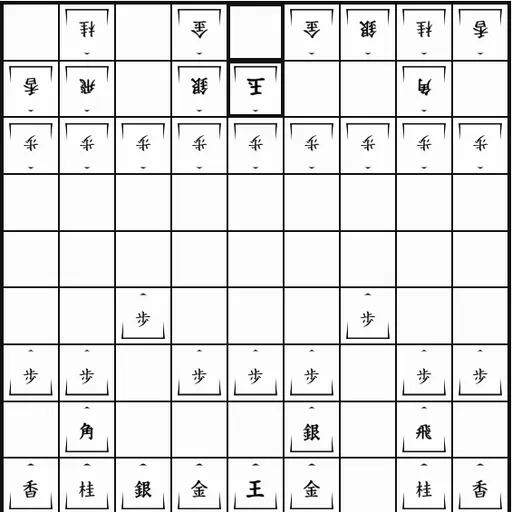
Shogi is the Japanese game of the chess family, played on a 9x9 board with five-sided tiles marked in kanji. Its famous rule is the drop: a piece you capture joins your hand and can return to the board on your side. The goal is to checkmate the enemy King. You can play either side against a three-level computer or pass the device to a friend.
How Shogi Works
Black, called Sente, starts at the bottom and moves first. On each turn you do one thing. You either move a piece on the board or drop a piece from your hand onto any legal empty square.
Most pieces have short moves. Gold and Silver generals step one square in fixed directions, the Knight leaps two forward and one to the side, and the Lance slides straight ahead. The Rook and Bishop slide far, much as they do in Western chess.
Reaching the far three rows lets a piece promote. A promoted Rook or Bishop adds a one-step move in its missing directions, and smaller pieces move like a Gold general. Captured pieces lose their promotion when they enter your hand. The hand rows above and below the board show how many of each piece both players hold.
Your First Few Minutes
- Choose your side and the Easy level, then press New game.
- Click a few pieces to learn how each one moves.
- Shift your King toward one side and keep generals beside it.
- Capture something, then try dropping it onto a useful square.
- When a promotion prompt appears, think about which form helps more.
Controls for Shogi
| To do this | Keyboard | Mouse | Touch screen |
|---|---|---|---|
| Move a piece on the board | Tab to the board, arrow keys to reach a square, Enter on your piece and again on the target | Click your piece, then the square it should move to | Tap your piece, then the target square |
| Drop a captured piece | not used | Click the piece in your hand row, then an empty square | Tap the piece in your hand row, then an empty square |
| Decide on promotion | not used | Click "Promote" or "Don't promote" when asked | Tap "Promote" or "Don't promote" when asked |
| Choose side and opponent | not used | Pick the side and a level, then click "New game" | Pick the side and a level, then tap "New game" |
| Undo or resign | not used | Click "Undo" or "Resign" | Tap "Undo" or "Resign" |
What It Trains
Shogi is deep strategic play. Because captured pieces come back, a trade is never just an even swap. You learn to count both the board and both hands before each move.
It also sharpens spatial reading. Every empty square near your King is a place an enemy piece might drop, and you start to see those gaps quickly.
Strategy Notes
- Castle before you attack. Tuck your King to one side behind Gold and Silver generals.
- Respect pieces in hand. A captured Silver can land right beside a King, so think twice before trading.
- Use pawn pushes to open files. A pawn trade gives you a pawn in hand and room for your Rook.
- Promote with care. A Silver or Knight sometimes fits the attack better without promoting.
- Fill the holes near your King. Empty squares there invite enemy drops.
Good to Know
The game in progress saves on its own, and Undo and Resign are always on hand. Shogi works with mouse, touch or keyboard and fits a phone held upright. It comes from Christopher Müller’s PaperGames collection, with kanji piece art adapted from Kadagaden’s set under CC BY 4.0.