Fleet Strike is a naval guessing game where you face the computer one shot at a time. You hide five ships on a 10x10 grid, the computer hides its own, and you take turns firing at squares you cannot see. Sink every enemy ship before your own fleet goes down and you win.
How Fleet Strike Works
Setup comes first. Choose a ship from the list, set its direction with Rotate Ship, and click a square on Your Fleet to drop it in. A preview shows where it will sit. Ships may lie across or up and down but not on a slant, and they cannot overlap or stick off the edge. Press Start Game once all five are placed.
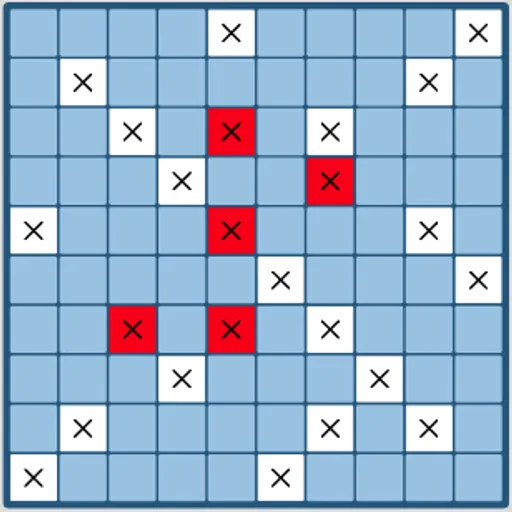
Both fleets are identical: an Aircraft Carrier of 5 squares, a Cruiser of 4, a Destroyer and a Submarine of 3 each, and a Patrol Boat of 2. Click any square on the Enemy Fleet grid to fire. Misses show a white square with an X, and hits turn red. A ship sinks when all its squares are hit.
The computer fires back once after each of your shots, and its results appear on your grid. When one fleet is gone, a message names the winner and Restart Game sets up a new battle.
Your First Few Minutes
- Place your ships apart from each other, mixing across and up-and-down.
- Press Start Game and fire at the middle of the enemy grid.
- Keep searching on every other square, like the dark squares of a checkerboard.
- After a red hit, test the four squares around it.
- Once two hits line up, follow that line until the ship sinks.
Controls for Fleet Strike
| To do this | Mouse | Touch screen |
|---|---|---|
| Pick a ship to place | Click its name in the Place Your Ships list | Tap its name in the list |
| Turn the ship before placing it | Click "Rotate Ship" | Tap "Rotate Ship" |
| Place the ship | Click a square on Your Fleet (a preview shows on hover) | Tap a square on Your Fleet |
| Fire a shot | Click a square on Enemy Fleet | Tap a square on Enemy Fleet |
| Play again after a game ends | Click "Restart Game" | Tap "Restart Game" |
What It Trains
Each shot is a small logic problem. You ask where a 3-square or 5-square ship could still fit given the misses so far, and you rule out spaces too small to hold anything. That is simple probability thinking, the same idea the computer uses against you.
Strategy Notes
- Search on alternating squares. The smallest ship covers 2 squares, so every other square is enough to find it.
- Sink before you search. When you score a hit, finish that ship before going back to hunting.
- Skip tiny gaps. A pocket of open squares too short for any ship left afloat is not worth a shot.
- Do not let ships touch. Gaps between your ships stop one run of hits from finding two at once.
- Be careful with corners. The computer’s opening pattern leans toward two opposite corners and the squares next to the other two.
Good to Know
Fleet Strike works with mouse or touch. Both grids sit side by side, so squares are small on a phone held upright. A tablet, a phone turned sideways in full screen, or a computer gives you bigger targets.