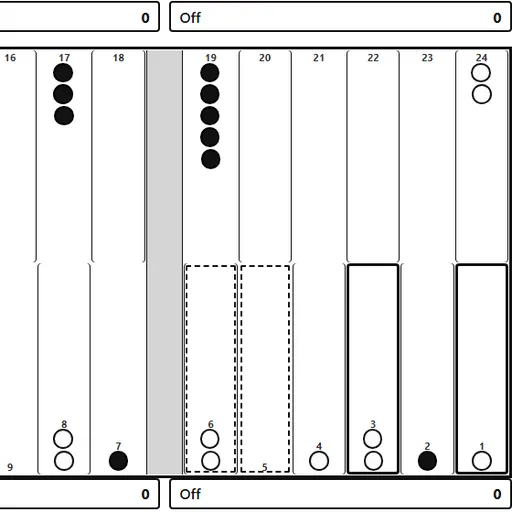
Backgammon is a classic race game for two sides, each moving 15 checkers in opposite directions around 24 points. Dice set how far you go, and your choices decide who gets home first. The goal is to bring every checker into your home board and bear them all off before your opponent.
How Backgammon Works
Press Roll dice to throw two dice, then move one checker per die. You cannot land on a point that holds two or more enemy checkers. Landing on a point with just one enemy checker hits it, and it goes to the bar.
A checker on the bar has to come back in through the opposing home board before anything else on that side may move. That can cost a player whole turns when the entry points are blocked.
Once all 15 of your checkers sit in your home board, select one and press Off to bear it off. Clear the board first to win. A plain win is worth 1 point, a gammon 2 and a backgammon 3, and the doubling cube multiplies the score.
Your First Few Minutes
- Open Menu, choose vs Computer, set it to Easy and start a new game.
- Roll the dice and click a checker, then click where it should go.
- Try to pair checkers on the same point so they are safe.
- Check the pip count under the dice to see who leads the race.
- When everything is home, select checkers and press Off.
Controls for Backgammon
| To do this | Keyboard | Mouse | Touch screen |
|---|---|---|---|
| Roll the dice | Tab to "Roll dice", then Enter | Click "Roll dice" | Tap "Roll dice" |
| Move a checker | Arrow keys to a point, Enter, then arrow to the target and Enter | Click a point with your checker (or the Bar), then the target point | Tap a point with your checker (or the Bar), then the target point |
| Bear off | not used | Select the checker, then click "Off" | Select the checker, then tap "Off" |
| Offer a double before rolling | not used | Click "Double" | Tap "Double" |
| Undo, resign or show the move list | not used | Click "Undo", "Resign" or "Moves" | Tap "Undo", "Resign" or "Moves" |
| Set up a new game | not used | Open "Menu", choose "2 Player (local)" or "vs Computer", then "New game" | Open "Menu", choose "2 Player (local)" or "vs Computer", then "New game" |
What It Trains
Each roll is a small math problem. You add pips, count how far a checker must travel and weigh which of your moves are possible with each die.
You also think about odds. A lone checker six or fewer points from an enemy can be hit with one die, so you judge which risks are worth taking.
Strategy Notes
- Check the race count. The pip line tells you whether to play safe or take chances.
- Protect lone checkers. A single checker within six points of an opponent is the easiest target.
- Make side-by-side points. A run of held points walls in a trapped checker.
- Cube when well ahead. The computer refuses doubles when far behind, so you collect the cube value.
- Step up to Hard. Once Medium feels comfortable, Hard leaves fewer checkers exposed.
Good to Know
You can play two people on one device with 2 Player (local). Undo, Resign and a move list are built in, and the computer’s speed can be set to fast, normal or slow. Games save in your browser and work well on phones. It comes from Christopher Müller’s PaperGames under the MIT license.