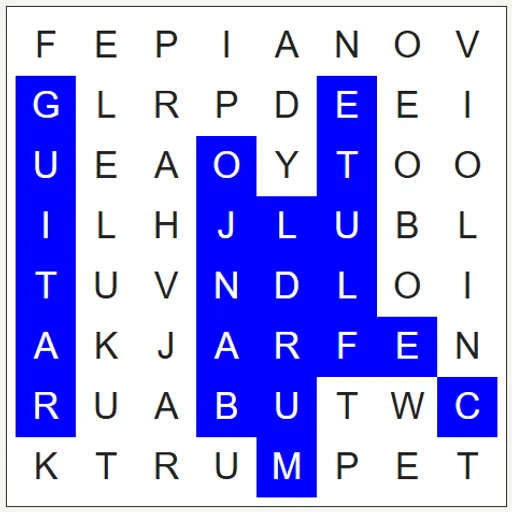
Word Search is a classic letter-grid puzzle with a themed list of twelve words. Words lie in straight lines, reading across, down, upward, in reverse or on a slant. Your goal is to find and mark all twelve.
How Word Search Works
A themed list, for example Fruit or Space, is picked as soon as the page opens. Choose a word, find where its opening letter sits, and drag along a straight path to its final letter.
An orange trail follows your drag, but only while the letters still match the start of a listed word. Complete a real word and its letters go blue while the list strikes it out. A wrong drag just disappears.
Words often cross and share letters. Random filler skips Q, X and Z, a handy hint. When every word is found, the grid turns green.
Your First Few Minutes
- Read the twelve words in the list.
- Pick the longest word and look for it first.
- Scan for its first letter, then check all eight directions around it.
- Drag from first letter to last and let go.
- If the orange trail stops, go back and try another direction.
Controls for Word Search
| To do this | Keyboard | Mouse | Touch screen |
|---|---|---|---|
| Select a word | not used | Press on the first letter and drag to the last | Touch the first letter and slide to the last |
| Switch to the next themed word list | not used | Click "New word list" | Tap "New word list" |
| Make a new grid from the words shown | not used | Click "New grid with these words" | Tap "New grid with these words" |
| Add or change a word | Type in a word box | Click "Add word" for an extra box | Tap "Add word" for an extra box |
| Reveal the remaining words | not used | Click "Solve Puzzle" | Tap "Solve Puzzle" |
What It Trains
Word Search builds visual focus and spelling recognition. You hold a word in mind while your eyes sweep rows, columns and diagonals for a matching pattern. Reading lines backward is a small but real challenge for many people.
Strategy Notes
- Look for Q, X and Z. Spotting one means a hidden word is right there.
- Start long. The starting grid matches the length of the biggest word, which therefore often fills an entire line.
- Read in reverse. If a first letter leads nowhere, search for the last letter instead.
- Watch the trail. When it stops growing, you have left every word’s path.
- Check crossings. Words that are already marked often cross unfound ones.
Good to Know
Fingers work fine on touch screens, and a narrow display stacks the grid over the list. Nothing needs saving. It runs on the open-source WordFind.js generator from Bill at BunKat LLC, extended by Lucas-C.