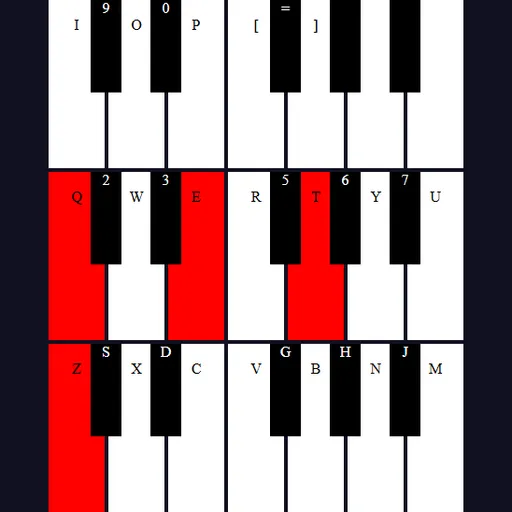
Tiny Synth Piano is a small instrument you play in the browser. It lays out 36 keys in three rows, one octave each, with the lowest row at the bottom. Every note is synthesized on the spot by your browser, so there are no sound files to load and no score to chase.
How Tiny Synth Piano Works
Press a letter on your computer keyboard and the matching piano key turns red while it sounds. When you release it, the note fades out quickly and the key color returns. You can hold several keys together to build chords.
The bottom letter row, starting with Z as a low C, plays the lowest octave, and keys like S and D give you the sharps. The Q row with the number keys above it covers the middle octave. The top octave continues on I, O, P and the bracket keys, and its last few notes are mouse or touch only.
Voice buttons at the top choose organ, brass, strings or a single tone. The Shape menu sets the wave to sine, square, sawtooth or triangle. Octave moves the whole piano up or down by up to three octaves, and Key shifts all notes by up to twelve half steps.
Your First Few Minutes
- Press Z, X, C, V, B, N and M to play a scale on the bottom row.
- Add S, D, G, H and J to hear the in-between notes.
- Hold three keys at once to make a chord.
- Click through the four voice buttons while playing one note.
- Try each wave shape and pick the one you like best.
Controls for Tiny Synth Piano
| To do this | Keyboard | Mouse | Touch screen |
|---|---|---|---|
| Play notes in the lowest octave | Z S X D C V G B H N J M | not used | not used |
| Play notes in the middle octave | Q 2 W 3 E R 5 T 6 Y 7 U | not used | not used |
| Play notes in the top octave | I 9 O 0 P [ = ] | not used | not used |
| Play or hold any key | not used | Press and hold on a key, or drag across keys with the button down | Touch and hold a key |
| Change voice, wave shape, octave or key | not used | Click the voice buttons, the Shape menu, or the arrows on Octave and Key | Tap the same controls |
What It Trains
Playing by letter keys means mapping a keyboard row to musical notes and remembering where each one sits. Picking out a melody by ear trains your focus on small differences in pitch. Fast runs across the keys also build finger speed.
Strategy Notes
- Compare one note four ways. Brass on square sounds nothing like brass on sine.
- Change Key instead of fingering. Move the key and play the same shapes to hear a tune higher or lower.
- Lower the octave for bass. The bottom row then pairs well with chords on the Q row.
- Use the extra keys. Comma, L, period, semicolon and slash repeat the first middle-octave notes.
- Sweep with the mouse. Hold the button and slide across keys for quick scales.
Good to Know
There is nothing to save and no session length. Frank Force first wrote this as 1Keys, a piano in about one kilobyte of code, and later added labels and controls. This site added touch input and resumes audio on the first note.