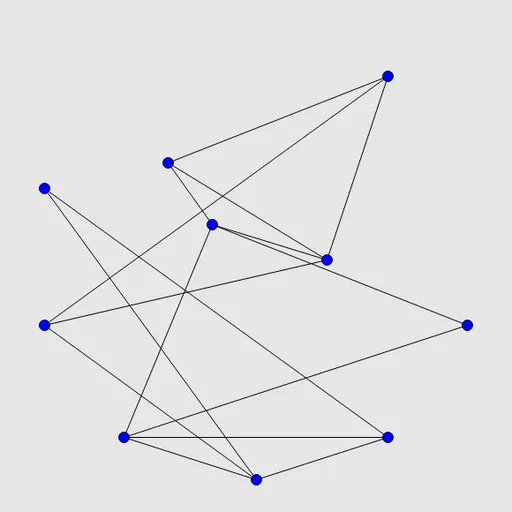
Untangle Lines is a calm drag-and-drop puzzle. You see blue dots joined by straight black lines, and the lines cross each other in a messy tangle. Your goal is to move the dots until no line crosses any other line.
How Untangle Lines Works
Each puzzle starts with all the points spaced around a circle, so the lines cut through the middle in a jumble. Press on any point and drag it somewhere new. Every line attached to it stretches and follows along.
The connections never change. Points that are joined stay joined, so the whole job is finding a good layout. Every puzzle is made from a drawing with no crossings, so a clean answer always exists. When the last crossing disappears, the board flashes.
You can choose 6, 10, 15, 20 or 25 points from the Type menu, or type any number under Custom. Ten points is the default. Undo, Restart and a Solve button are always available.
Your First Few Minutes
- Start with the default 10-point puzzle.
- Look for three points that are all joined to each other and pull them apart into a triangle.
- Drag points with only two or three lines into place around that triangle.
- Use the empty space at the edges of the board to park finished parts.
- Turn on the crossing highlight in Preferences to see which lines still need work.
Controls for Untangle Lines
| To do this | Keyboard | Mouse | Touch screen |
|---|---|---|---|
| Move a point | not used | Click and drag the point | Drag the point with your finger |
| Pick and move a point by keyboard | Arrow keys or Tab/Space to choose a point, Enter to pick it up, arrows to move, Enter to drop | not used | not used |
| Undo, redo, new puzzle | U / R / N | Undo move, Redo move and New game buttons | Undo move, Redo move and New game buttons |
| Change the number of points | not used | Type menu | Type menu |
What It Trains
Untangling is a spatial reasoning workout. You picture where a point should go so its lines slip past others, and you notice small shapes like triangles hidden inside the tangle. Fixing one crossing at a time teaches you to break a messy problem into small steps.
Strategy Notes
- Build from a triangle. Three points joined to each other form a solid frame.
- Place busy points late. Points with many lines are easier once the simpler ones are settled.
- Spread out. The starting circle uses only part of the board, so use the corners.
- Solve one crossing at a time. Move an end point of one line around the other.
- Turn on helpers. Crossing highlights and grid snapping are in Preferences.
Good to Know
Dragging works with a mouse or a finger, and this site added a small touch layer for phones. There is no sound and no timer. Untangle is part of Simon Tatham’s Portable Puzzle Collection.