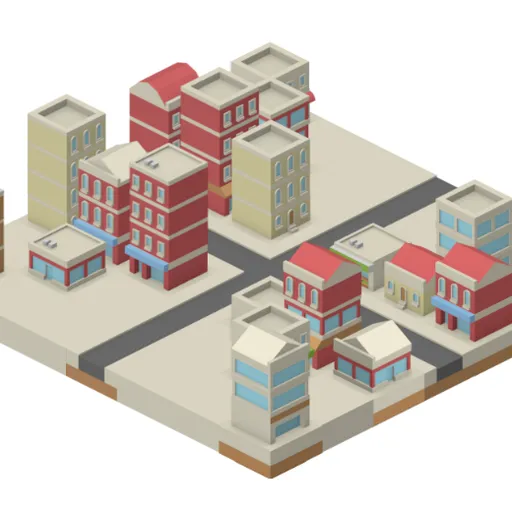
IsoCity is a relaxed sandbox for building a little isometric town. You start with a 7x7 patch of bare ground and a palette packed with roads, crosswalks, canals, walls and buildings. Your goal is whatever you choose, because the game only cares about how your town looks.
How IsoCity Works
Choose a tile from the palette on the left, then click or tap a square on the map. The new tile replaces anything already there. With a mouse you can hold the button and sweep across squares to paint one tile many times, which makes long streets quick. A shaded diamond shows which square you are about to change.
The palette is loosely grouped. Straight roads in two directions, crosswalks, tree-lined streets, a roundabout and crossings come first. Curves, bends and dead ends follow, then water channels and red wall pieces. The final rows hold buildings, from corner shops to glass offices and brick apartment blocks.
Each road piece has a fixed shape and facing, so you pick the one that lines up with its neighbors. With only 49 squares, the whole map is always in view.
Your First Few Minutes
- Scroll the palette to see every tile on offer.
- Pick a straight road and paint a line across the middle of the map.
- Add a crossing and a few side streets.
- Fill the blocks between roads with shops and taller buildings.
- Right-click any square you dislike and try a different tile.
Controls for IsoCity
| To do this | Mouse | Touch screen |
|---|---|---|
| Pick a tile | Click it in the palette (scroll the palette for more) | Tap it in the palette |
| Place the tile | Click a square on the map, or hold the button and drag to paint | Tap a square on the map |
| Clear a square | Right-click it | Pick the plain ground tile (first in the palette) and tap the square |
What It Trains
IsoCity is mostly spatial play. Fitting road pieces together means you picture which edges each tile opens on before you place it. You also think about depth, since tall buildings near the front of the view can block what sits behind.
It rewards a bit of focus and planning too, such as laying out streets before filling blocks so nothing gets hidden.
Strategy Notes
- Streets before buildings. Roads are flat and easy to see, so mark them out first.
- Tall pieces go at the back. Tiles lower on screen are drawn over the ones behind them.
- Read each road picture. Check which sides a piece connects on before you drop it beside another road.
- Edge with water. A row of canals makes a tidy border for a park or waterfront.
- Vary the skyline. Mix low shops with taller blocks so the town has shape.
- Wipe fast. Paint the plain ground tile across a corner to clear it in one pass.
Good to Know
Your town saves in the browser after each placement. Touch works on phones, though drag painting is a mouse feature. Victor Ribeiro wrote the open-source original, and the tiles come from Kenney’s free art library.