Logic Mines takes the classic hidden-mine grid and removes the luck from it. The mines are not set at the start. A logic solver places them during play and turns any careless guess into a loss. You win by opening every empty square through reasoning alone.
How Logic Mines Works
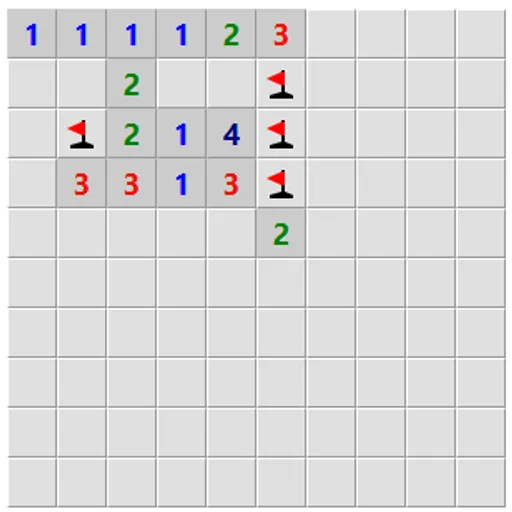
An open square displays a number for the mines among the eight squares around it. Nothing can go wrong on the opening click. Past that point the numbers are all you have.
Squares the clues prove empty always open. Pick a merely possible square while a provable one sits somewhere else, and the solver drops a mine under you, which ends the game. If the border of your cleared region has no provable square at all, then a guess on that border that might be empty is guaranteed to be. A box below the board extends that protection to distant squares too.
Board settings let you type your own size and number of mines, or pick a preset from Easy through Expert. The largest grid is 30x30. A hint button reports if a safe move exists, if a guess is forced or if a flag you placed is wrong.
Your First Few Minutes
- Choose the Easy preset and press New game.
- Click any square to open a safe first area.
- Flag squares the numbers prove are mines with a right-click or long press.
- Open every square the flags prove safe.
- If nothing looks safe, press the hint button before guessing.
Controls for Logic Mines
| To do this | Mouse | Touch screen |
|---|---|---|
| Reveal a square | Left-click | Tap |
| Cycle flag, question mark, blank | Right-click | Press and hold for half a second |
| Open all neighbors of a number whose mines are flagged | Double-click or middle-click the number | not used |
| Reveal a square in safe mode | Double-click | not used |
| Start a new board | Click "New game" | Tap "New game" |
What It Trains
This is a logic puzzle with a little counting. You compare neighboring numbers, subtract flagged mines and prove which squares must be empty.
It builds focus because one lazy click costs the round. You learn to scan the whole edge for a sure move before you commit.
Strategy Notes
- Scan before you guess. A guess only works when nothing safe is left anywhere on the edge.
- Flag sure mines right away. Flags unlock the double-click shortcut on numbers.
- Ask for a hint. It tells you if a safe square exists, which settles whether to keep looking.
- Try countdown mode. Numbers then show mines still unflagged, which makes patterns clearer.
- Study a lost board. The dots show exactly where a proof was waiting.
Good to Know
On a touch screen you tap to reveal and hold a finger down to flag, and safe mode cuts down on mistaps. Optional rules include countdown numbers, safe mode, guessing anywhere and a debug view. Board size and mine count are fully adjustable for short or long sessions.