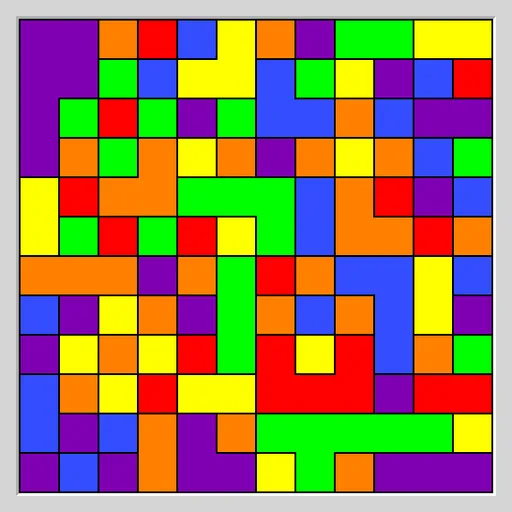
Flood Fill Puzzle hands you a grid of squares in six random colors. The top left square owns a patch, and each move repaints that whole patch in a color you choose. Matching neighbors join in, so the patch spreads. Your goal is to make the entire grid one color within the move limit.
How Flood Fill Puzzle Works
Click or tap any square to pick its color. The corner patch changes to that color, and every same-colored square touching it along a side merges into it. Diagonal contact does not count. Choosing the color the patch already has does nothing and does not use a move.
A status bar under the grid shows moves used and the limit, written like 3 / 25 moves. Fill the whole board at or under the limit and it says COMPLETED. Go over and it says FAILED, though you can still finish the grid, undo to try a new order, or restart.
The puzzle is Flood from Simon Tatham’s Portable Puzzle Collection. Pieces never move around. Only the color of the growing patch changes.
Your First Few Minutes
- Start the default Easy board and check the move limit.
- Look at the colors touching your patch and count how many squares each would add.
- Pick the color that adds the most.
- Try to push a long arm toward the bottom right corner.
- If you run over, press Undo a few times and try a different order.
Controls for Flood Fill Puzzle
| To do this | Keyboard | Mouse | Touch screen |
|---|---|---|---|
| Fill the corner region with a color | Arrow keys to move the cursor, then Enter | Left-click any square of that color | Tap any square of that color |
| Undo or redo a move | U / R | Undo move / Redo move buttons | Undo move / Redo move buttons |
| Start a new grid | N | New game button | New game button |
| Change size, colors or difficulty | not used | Type menu | Type menu |
What It Trains
Each move is a small logic choice. You compare the colors on your border and estimate which one grows the patch most. Good play needs a plan several moves ahead, so you think about which color to save for later and which stray squares to collect on the way.
Strategy Notes
- Count, then click. The closest color is not always the biggest gain.
- Reach for the far corner. A long arm across the board touches many new squares at once.
- Wipe out a color. If all of one color borders your patch, taking it now removes it from the game.
- Watch for loners. A single odd square deep in the grid can cost a full move at the end.
- Compare with Undo. Test two orders and keep the one that leaves fewer colors.
Good to Know
The board fits phones and computers alike. Seven preset types cover sizes and color counts, and Custom handles the rest. Rounds are short, so it suits a quick break.