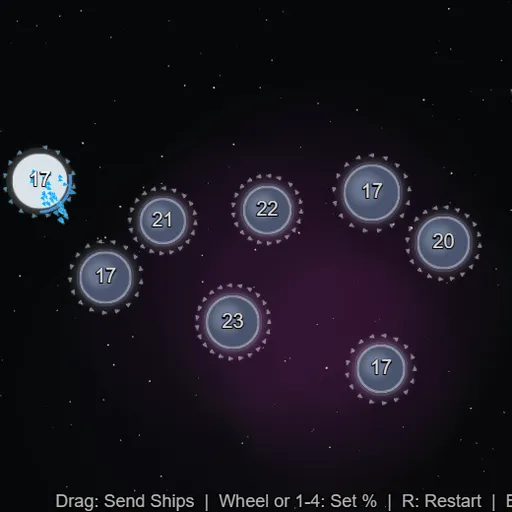
OrbitSwarm is a quick real-time strategy game on a single screen of planets. You begin with one blue home world, the computer has one red world, and gray neutral planets fill the space between. You drag from your planets to launch streams of tiny ships, and every planet you hold keeps building more. Frank Force built it for his free LittleJS Arcade collection.
How OrbitSwarm Works
Choose EASY, MEDIUM or HARD on the title screen. The difficulty changes the number of planets, starting fleets and how sharp the rival is. On EASY you get 70 ships against 20 and a slower rival, while HARD gives the rival more ships and perfect information.
Press on a planet you own, drag to any target and release. Ships fly out in a stream and arrive one at a time. Each one that reaches an enemy or neutral world removes one defender, and when defenders run out, the planet becomes yours with the leftover ships. Ships sent to your own planet simply join it.
Larger planets build faster and hold more ships. A ring shows how full each of your planets is, and production stops at the limit. Neutral planets do not grow until captured.
Your First Few Minutes
- Start on EASY and find your planet with the blue ring.
- Drag from it to a small neutral planet close by with few defenders.
- Grab two or three more nearby neutrals to boost production.
- Move spare ships from full back planets to the front line.
- Strike red planets just after they launch an attack.
Controls for OrbitSwarm
| To do this | Keyboard | Mouse | Touch screen |
|---|---|---|---|
| Send a fleet | not used | Press on your planet, drag to a target and release | Drag from your planet to a target |
| Set the share of ships sent | 1 = 10%, 2 = 25%, 3 = 50%, 4 = 100% | Scroll the wheel while dragging | not used |
| Restart the match | R | not used | not used |
| Pause | Esc | not used | not used |
What It Trains
OrbitSwarm is a strategy game with quick math. You compare your ship count against defenders, add a margin for growth during flight and decide how much to send.
It also needs focus. You watch several planets at once, keep production running and react when the rival makes a move.
Strategy Notes
- Take close neutrals early. Small nearby worlds start producing right away and pay back fast.
- Overshoot a little. Targets keep building while your ships travel, so send extra.
- Avoid full planets. A planet at its limit stops building, so push ships forward.
- Counter after an attack. The rival often sends half or more of a planet’s fleet, which leaves it thin.
- Save full sends. Emptying a planet with a 100% send makes it easy to lose.
Good to Know
OrbitSwarm works with a mouse, touch or keyboard. There is no save between matches, and a single round fits a short break.