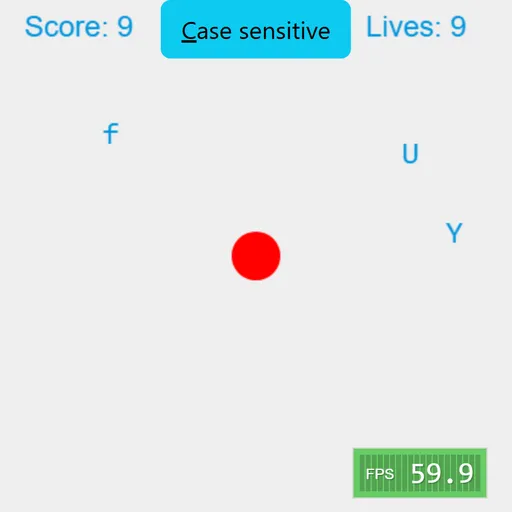
Typer Defense is a fast reaction game that uses your keyboard as the controller. A red circle sits in the center, and single letters slide toward it from the left and right edges. Your goal is to press the right key for each letter before it reaches the circle and to last as long as you can on 10 lives.
How Typer Defense Works
Letters appear at random heights along both side edges, each moving at its own speed. A correct key press pops one letter into a burst of colored dots and adds a point. Pressing a letter that is not on screen takes a point away, while numbers and the space bar are ignored.
At the start, the game is case sensitive. Capital letters need Shift, and small letters must be typed without it. Click the button at the top to turn this off, and then only small letters appear.
When any letter touches the circle, you lose a life and the screen is cleared with a message telling you to start again. After the tenth life, a game over message appears and the score resets to zero.
Your First Few Minutes
- Click “Case sensitive” to turn it off for an easier start.
- Keep your fingers resting on the home row of the keyboard.
- Press the key for whichever letter is closest to the core.
- Ignore letters still near the edges until the urgent ones are gone.
- Turn case sensitivity back on when you feel ready for capitals.
Controls for Typer Defense
| To do this | Keyboard | Mouse |
|---|---|---|
| Destroy a letter | Press the matching letter key | not used |
| Type an uppercase letter | Shift + the letter | not used |
| Pause or resume | Esc | not used |
| Switch case sensitive on or off | not used | Click the "Case sensitive" button |
What It Trains
Typer Defense sharpens the link between seeing a letter and finding its key. You learn to judge which letter will arrive first and handle that one, then the next. Because wrong keys cost points, it rewards accuracy over mashing.
Strategy Notes
- Work by distance, not arrival order. A fast letter halfway in is more urgent than a slow one at the edge.
- Read before you press. A wrong key lowers your score.
- Double-tap duplicates. The newest copy clears first.
- Learn without capitals. Small letters only let you focus on key positions.
- Pause during a rush. Esc gives you a breather.
Good to Know
You need a physical keyboard, since phones do not open their on-screen keyboard for this game. The screen resizes to fit the window. Berk Erol made the original game, called Typer, as a small open-source project.