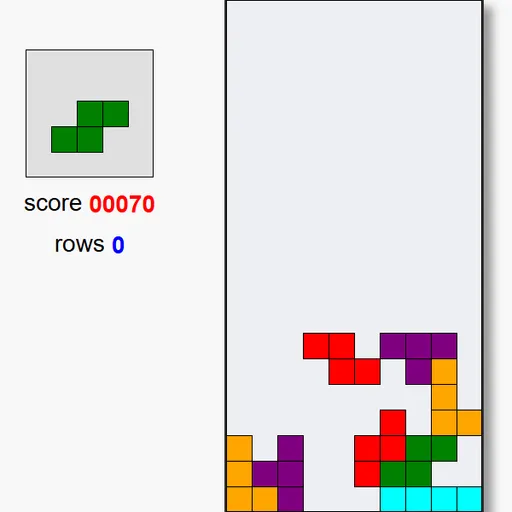
Block Drop is a falling-block puzzle on a single canvas. Pieces made of four squares drop into a court ten blocks wide and twenty tall. The goal is to fill complete rows so they clear, and to last as long as you can as the speed increases.
How Block Drop Works
Start with Space or a click on the start text. A piece appears at the top and falls one row at a time. You can slide it, rotate it or push it down. When it cannot fall further, it locks in place and the next piece, shown in the preview box, enters.
Any row filled across all ten columns vanishes, and the rows above drop down. Your row total and score update on the left. As your row total grows, pieces fall faster, from one row every 0.6 seconds down to 0.1 seconds after 100 rows.
New pieces in this version enter at a random column, not always the center. A tall stack anywhere along the top can end the game.
Your First Few Minutes
- Press Space to start and watch the first piece fall.
- Slide it left or right and rotate it to fit the bottom.
- Check the preview box to see what comes next.
- Try to fill the bottom row completely to clear it.
- Keep the stack low and even as pieces start to speed up.
Controls for Block Drop
| To do this | Keyboard | Mouse |
|---|---|---|
| Start a new game | Space | Click "Press Space to Play." |
| Move the piece left or right | Left and Right arrows | not used |
| Rotate the piece | Up arrow | not used |
| Drop the piece one row faster | Down arrow (hold to keep dropping) | not used |
| End the current game | Esc | not used |
What It Trains
This is a spatial puzzle under time pressure. You turn shapes in your head and find where each one fits before it lands.
Planning matters too. You think about the current and the next piece together and keep the surface flat so future pieces have a place to go.
Strategy Notes
- Plan two pieces at once. The preview lets you place the current piece with the next in mind.
- Avoid deep holes. Narrow gaps are hard to fill, so keep small steps instead of towers.
- Leave a column open. A gap along one wall lets the long bar clear four rows for 800.
- Rotate near the top. Walls and blocks can stop a turn in tight spots.
- Check the entry point. A piece may already be near a wall when it appears.
- Use short taps on Down. Each press moves one row, so you will not overshoot.
Good to Know
There are no touch controls, so a keyboard is needed and desktops or laptops work best. The court scales to fit your window. Jake Gordon wrote this compact version in plain JavaScript.