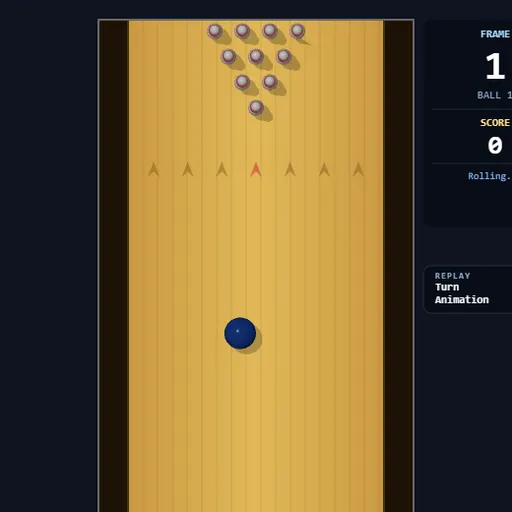
Strike Lane Bowling is a ten-pin game viewed from above, where the mouse acts as your throwing arm. You drag back to load power and snap forward to send the ball down the lane. Your goal is a high score across ten frames, and a perfect game of twelve straight strikes adds up to 300.
How Strike Lane Bowling Works
Each throw starts with the ball resting behind the red foul line. Slide the mouse sideways to choose where it starts. Then hold Space, pull the mouse downward to fill the power meter, and push it upward quickly to release.
The speed of that upward push, combined with the stored power, sets how fast the ball rolls. Sideways drift during the push tilts the ball and adds spin, and that spin bends its path most in the middle of the lane. Pins that fall on your first ball are cleared before the second.
The scorecard at the bottom uses standard rules. A strike scores 10 plus the pins from your next two balls. A spare scores 10 plus the pins from your next ball. After strikes and finished frames, a 3D side camera replays the action.
Your First Few Minutes
- Click the lane or press Enter to start a new game.
- Leave the ball in the center of the lane and hold Space.
- Drag down until the meter is nearly full, then flick straight up in one fast motion.
- Read the side panel, which tells you the next step of each throw.
- Once you can hit the front pin on purpose, try a small sideways drift to add hook.
Controls for Strike Lane Bowling
| To do this | Keyboard | Mouse |
|---|---|---|
| Start or restart a game | Enter | Click the lane |
| Aim (slide the ball left or right) | not used | Move left or right while the ball waits at the foul line |
| Charge power | Hold Space | While holding Space, drag down |
| Throw, add angle and hook | Keep holding Space | Flick up fast; drift sideways during the flick to curve it |
| Cancel a charged throw | Esc, or let go of Space | not used |
| Turn replays on or off | not used | Click the Turn Animation switch |
What It Trains
Bowling here is about timing and hand control. You learn to repeat the same quick flick, and you adjust by a few pixels when the ball drifts. Reading the scorecard also builds number sense, since a strike’s value depends on the two balls that follow it.
Strategy Notes
- Fill the meter first. A fast flick on low power still gives a slow ball, so charge close to 100 percent.
- Release in one snap. The ball leaves the moment the mouse starts moving up, so a lazy push throws away speed.
- Offset your start for a hook. If your flick curves right, begin a bit left of center so the bend carries it into the pocket.
- Shoot spares straight. Line the ball up with the leftover pins and flick with no sideways motion.
- Turn replays off to practice. Without the four-second replay, you can throw many balls in a row.
- Press Esc to bail out. If a charge feels wrong, cancel it and set up again.
Good to Know
This game needs a keyboard and mouse at the same time and has no touch controls, so play it on a computer. A full game takes a few minutes. It was made by isocialPractice as a code editor extension, and this site serves only the browser version.