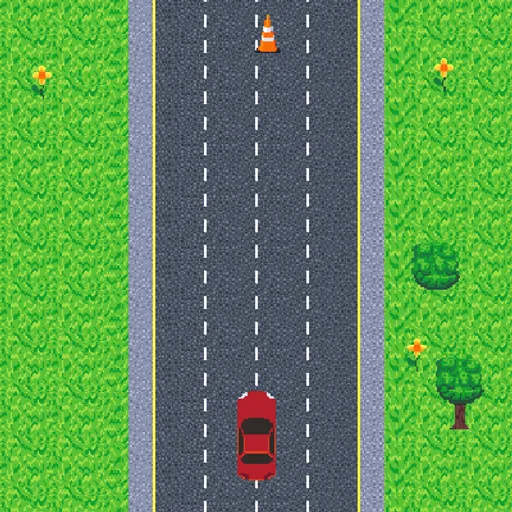
Infinite Cars is an endless driving game with one job: do not hit anything. Your red car rolls up a pixel-art highway that goes on forever, and you slide it from side to side to avoid cones and other drivers. The goal is to travel as far as you can before your first crash.
How Infinite Cars Works
A tap on the title screen brings up a traffic light and a quick hint. When the light clears, the car starts moving at a steady speed you cannot change. Your only input is where the car sits across the road. Hold the car itself and drag it left or right, anywhere between the two road edges.
Hazards come in three kinds. Cones stand still in a lane. Slow cars cruise ahead, so you catch up to them. Fast cars come from behind and shoot past. Because the computer cars also swerve around cones, traffic keeps reshuffling.
Your score is the distance covered since the light went green. One touch with a cone or car ends the run in an explosion.
Your First Few Minutes
- Hold your phone upright, or use the mouse on a computer.
- Tap the title screen and wait for the light to clear.
- Put your finger on the red car and keep it there.
- Make small slides to step around the first cones.
- Check below your car now and then for fast traffic.
Controls for Infinite Cars
| To do this | Mouse | Touch screen |
|---|---|---|
| Start a run, or retry after a crash | Click anywhere | Tap anywhere |
| Move the car sideways | Drag the red car left or right | Drag the red car left or right |
| Mute or unmute sound | Click the speaker icon, top right | Tap the speaker icon, top right |
What It Trains
This is a reflex and attention game. You scan the road ahead, glance at the lane behind and react with a short, exact drag. Over a long run, staying calm and steady matters more than speed.
It also rewards reading other drivers. When a slow car nears a cone, you learn to expect its swerve and leave room for it.
Strategy Notes
- Hover near the center. From the middle you can reach either edge with one short drag.
- Do not let go. Dragging only works while you hold the car, so lifting off wastes time.
- Nudge, do not swing. A small move clears most cones, while a wide swing can put you in a new car’s path.
- Predict swerves. Slow cars sidestep cones ahead of them, so their new lane is often the gap you wanted.
- Use your ears. A sound plays when another car comes level with you.
Good to Know
It is made for one finger on a phone held upright, but it works fine with a mouse too. Runs are short, so it suits a quick break. Takane Ichinose made the pixel art and sound effects, and the code is open source under GPL-3.0.