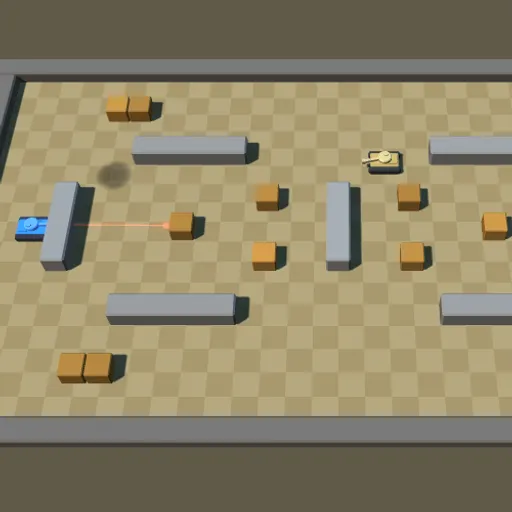
Tank Ricochet is an arena shooter where you drive a small blue tank against waves of enemy tanks. The arenas are filled with stone walls and wooden crates, and your shells can bounce off stone once. Your goal is to survive as many waves as you can, using banked shots to hit targets you cannot reach directly.
How Tank Ricochet Works
Each wave loads one of four arena layouts and places enemy tanks on the right side. Destroy all of them to clear the wave and earn a bonus worth 100 points times the wave number. Later waves bring more opponents, up to eight at a time.
Your hull turns to face the direction you steer and drives once it lines up. The turret aims on its own toward your pointer or right stick, and a red line shows where the next shell will travel. A shell bounces off stone a single time and disappears on its second stone hit, while crates and barrels stop it at once.
Mines start appearing in wave 2 and explosive barrels in wave 3. Shooting either one, or rolling over a mine, causes a blast that hurts every tank close by, including yours. Clearing every third wave gives you an extra life, up to five.
Your First Few Minutes
- Drive with W A S D or the arrow keys and aim with the mouse.
- Check the red aiming line before each shot.
- Take out the sentries first, since they never move.
- Try one bank shot off a stone wall at a tank hiding behind cover.
- Keep space between you and any wall you are shooting into.
Controls for Tank Ricochet
| To do this | Keyboard | Mouse | Touch screen |
|---|---|---|---|
| Drive the tank | W A S D or arrow keys | not used | Left on-screen stick |
| Aim the turret | not used | Move the pointer | Right on-screen stick |
| Fire a shell | Space | Left click (hold to keep firing) | Push the right stick |
| Pause | Esc | Menu icon in the top right corner | Menu icon in the top right corner |
What It Trains
Every bank shot is a quick geometry problem. You judge the angle where a shell hits a wall and where it will travel next. You also have to react fast while choosing safe positions, which mixes split-second aiming with planning around cover and hazards.
Strategy Notes
- Trust the red line. It traces the shell up to its first contact, so use it to plan each bounce.
- Hide behind stone. Sit beside a block and angle shots around its edge while enemy fire hits the wall.
- Turn hazards into weapons. A barrel or mine near a cluster of enemies can take out several in one blast.
- Avoid point-blank wall shots. After one bounce your shell can hit you too.
- Shoot down incoming rounds. Colliding shells cancel out.
- Break only the crates in your way. Keep the ones that protect you.
Good to Know
Tank Ricochet works with a keyboard and mouse, a gamepad, or two on-screen sticks on a touchscreen held sideways. Your best score is saved. Frank Force built it with his LittleJS engine, and all models, textures and sounds are generated in code.